I’ve had a C64 game in development for a while, along with several other game/demo projects, and I’ve required robust image conversion and editing for those. To date, the best image converter I could find is RetroPixels, and none of the editors quite suited my needs. The problem I found with all of them is that they feel like in-house one-offs, with just enough implemented to get someone’s job done, but not polished and not tested, with lots of crashing, etc.
Bolting on filters and plugins for larger image editors is not a great path either, in my opinion. I wanted something built out as a fully polished app, with the Commodore 64 pallet and restrictions at its core, not an afterthought.
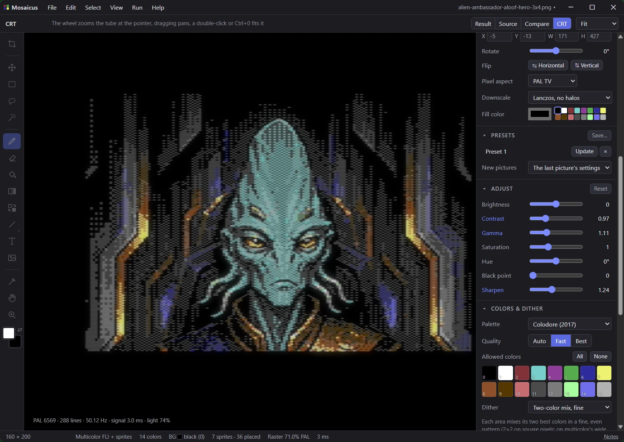
So I present to you Mosaicus. MIT license; a Rust app for Windows, MacOS, and Linux. Download and more details at the link. Below I will post a summary of the technical features, but it’s fully documented with an extensive help file here.
I welcome feedback, especially if you a C64 artist and you are missing something in Mosaicus that you’d like to have. I am open to adding more editing features if there is interest.
Mosaicus 0.1.0 – C64 graphics converter and pixel editor. Windows, macOS, Linux. MIT license.
FORMATS
- Hires 320×200, Multicolor (Koala) 160×200
- Hires FLI (AFLI), Multicolor FLI
- Hires + sprites, Multicolor + sprites: up to 64 multiplexed sprites, max 8 per line
- Hires FLI + sprites, Multicolor FLI + sprites: sprite 0 over the FLI bug, full 320 width
- Sprite pins: hand-placed sprites with fixed colors and kinds
- Hires / Multicolor / ECM character pictures: fitted into 256 or 64 chars, color per cell or per char
- Charset logo: ECM (64 chars, 4 backgrounds) or plain charset (256), char editor
- Multicolor sprite sheet, four color roles
- C64 Ultimate / Ultimate 64 Elite-II, 64 MHz beam racing: hires with 16 colors per pixel (320 or 384 wide),
hires band + chunky, chunky 160×200 and 80×50 - 48 MHz: hires 240 with 16 colors per pixel, band and chunky formats
- SuperCPU: multicolor with a background color per 4×1 cell
CONVERSION
- Cell colors chosen for what the dither actually mixes, judged by a perceptual model of the C64 screen
- Auto quality: fast while adjusting, refined to Best on pause; Koala/hires under 100 ms
- Framing: crop or fit, scale, offset, free placement, rotate, flip
- Pixel aspect: square, PAL, NTSC
- Downscale: Lanczos, Lanczos no halos, Box, Bilinear, Nearest, Majority (flat and pixel art)
- Adjust: brightness, contrast, gamma, saturation, hue, black point, sharpen
- Palettes: Colodore, Pepto, VICE .vpl, custom
- Allowed colors; background and shared colors auto or fixed
- Already-C64 pictures (hires, Koala, VICE screenshots, 22 VICE palettes) detected and opened exact
- Presets: named settings, applied to every new picture if wanted
- Command line: mosaicus convert / mosaicus formats
CONVERSION DITHERS
- None
- Two-color mix, fine (2×2) / more tones (4×4; 8×8 on wide pixels)
- Ordered: Bayer 2×2, 4×4, 8×8 (pattern dithering, mixes of 2+ colors), blue noise
- Error diffusion: Floyd-Steinberg, Atkinson, Sierra, Sierra two-row, Sierra Lite,
Jarvis-Judice-Ninke, Stucki, Burkes; serpentine; error weighted by on-screen distance on wide pixels - Wide-pixel patterns: diagonal, classic, rows (PAL delay line blend)
- Strength, Similar only, Protect outlines + outline width (dither-free edges)
DRAWING TOOLS
- Pencil: Draw, Shade, Spray; square, round or soft (dithered edge) brush 1-32 px; pixel-perfect lines
- Shade: left button one step lighter, right button one step darker, once per stroke
- ramps: auto (the color’s own C64 family), all 16 by lightness, Gray, Blue, Purple, Red,
Brown to gold, Green, Cyan, Acid, Fire, Sunset, Chrome, Rainbow, Night, Neon, user ramps - follows allowed colors and cell limits (steps to the next color the cell can take)
- Pencil paints: color, two-color pattern, pattern in its own colors, dither mix, generated fill
- Custom brush from selection: flip, rotate 90, secondary color transparent
- Eraser: back to the conversion; square, round, soft
- Fill: area clicked, that color everywhere, or the selection
- Gradient (below)
- Replace color
- Shapes: line, curve (1 or 2 bends), rectangle, rounded rectangle, ellipse, polygon; outlined or filled
- Shift snaps shapes to clean angles: 1:1/2:1/1:2, fine (3:1, 4:1), isometric 2:1, 45 degrees
- Text: built-in 8×8 C64-style font, 3×5 font, any installed TTF/OTF; scale, spacing, bold,
hard/dithered/blended edges, outline, shadow - Image stamp: auto background removal, 1:1 pixel-art detection, own colors (dithered) or stencil
- Eyedropper, Hand, Zoom
- Symmetry: left/right, top/bottom, 4-way mirror, 4- and 8-way rotation, movable center
- Cell limits per tool: recolor cell, keep cell colors, or allow clash; clash outlines and count;
Recolor clashing cells command - Sketch layer: construction lines, saved with project, never exported
GRADIENT TOOL
- Linear, radial, diamond, conical
- Live until applied: drag ends (Shift 15 deg steps), move line, colors and settings update live
- Ramp: primary to secondary through in-between colors (auto), or custom up to 32 colors;
built-in and saved ramps - Dither: none (bands), Bayer 2×2/4×4/8×8, checker, clustered dots 4×4 and 8×8 45 deg,
horizontal lines (PAL blend), vertical lines, diagonal lines, blue noise, random - Repeat: once, repeat, there and back, 1-16x; bias, offset, angle
- Planned per cell to keep its look within cell limits
- Fills selection, area clicked, or one color everywhere
- Also a fill style for shapes, text and image stamps
FILL STYLES
- Dither mix: two colors at a level, same 11 dithers, optional see-through secondary
- 26 built-in two-color patterns, 2×2 to 16×16, scale 1-8, invert, offset, save
- Patterns picked up from the picture in their own colors (up to 64×64), My patterns library
- 26 generated fills: maze, 10 PRINT, Truchet, Hilbert curve, Greek key, bricks, bevel tiles,
herringbone, basket weave, stone wall, honeycomb, iso cubes, iso grid, fish scales, diamonds,
tartan, cracked cells, circuit board, plasma, contour lines, rings, sunburst, grid floor,
starfield, star layers, fractals (Sierpinski, carpet, Cantor dust) - seeds, align to cells, color ramps kept to each cell’s colors
SELECTIONS AND TRANSFORMS
- Rectangle, lasso, magic wand; add, subtract, intersect
- Grow/shrink 1-64 px; select transparent in source; named saved selections in the project
- Floating pieces: move, nudge by pixel or cell, flip, exact 90 deg turns, any angle (RotSprite), scale
- Outline and drop shadow; see-through color; clipboard with other programs
VIEWS AND CHECKS
- Result, source + frame, compare split, CRT
- Brightness only; VIC-II 9 luma levels
- Stray pixel and jaggy markers with fixes; trace source; hand edits marked
- Pixel grid; format guides (cells, chars, sprite boxes, row/column rulers, FLI bug band)
- CRT model: PAL 6569, NTSC 6567R8, 6567R56A; composite, S-Video, RGB; notch/comb filter;
PAL delay line; dot crawl; phosphor mask, beam, glow - Preview panel or window: sharp, modern screen (Ultimate HDMI scanlines, VICE filter), CRT
INPUT
- PNG (with alpha), JPEG, GIF, BMP, WebP, TIFF, TGA
- Koala, Advanced Art Studio, Art Studio, Doodle!, Hi-Eddi, Interpaint, AFLI, FLI Designer,
Blackmail FLI; sprite and charset data; CharPad projects
OUTPUT
- Koala, Advanced Art Studio, Art Studio, Doodle!, Hi-Eddi, AFLI, FLI Designer, SpritePad .spd,
CharPad .ctm (offered only when the picture fits exactly) - Raw .bin, .chr; assembly data for KickAssembler, ACME, 64tass/ca65
- .prg viewer; viewer source for KickAssembler/ACME, byte-identical, with memory map
- PNG 1:1 or as shown
- Run in VICE (x64sc, xscpu64), same window reused; run on a C64 Ultimate over the network
- Viewer raster time shown in the status bar
PROJECTS
- .mosaicus files: settings, hand edits kept over the conversion, sketch, saved selections
- One undo history (500 steps), crash recovery, all-or-nothing saves