Quality
Quality decides how hard the converter works on the colors of each cell. A fast conversion follows every slider as you drag it; the Best conversion takes longer and looks clearly closer to the source. With Auto, the usual choice, you get both: the fast one while you adjust, the best one when you pause.
Quality is in the Colors & dither panel, under Palette. It shows for the formats where cell colors are worth searching harder (below), when the picture has a source.
Auto, Fast and Best
| Choice | What it does |
|---|---|
| Auto (default) | The fast conversion while you adjust, refined to Best when you pause. |
| Fast | Always the fast conversion. |
| Best | Best on every change: slower to follow a slider. |
With Auto, a line under the buttons says where things stand:
- "Refines to Best when you pause." The fast conversion shows; the refined one follows a moment after you stop changing settings.
- "Showing the refined picture (Best)."
- "Not refined: you painted over this conversion, and Best would recolor the cells under your edits. A settings change refines again." See Refining and your edits.
The refinement starts about 0.7 seconds after the picture last updated, and never while a mouse button is held (in the middle of a stroke or a drag). It works in the background: it adds no step to the history and changes no setting. The next change you make shows the fast conversion again, then refines again.
Auto and Fast are your preference, kept by the app for every picture. Best belongs to the picture: it is saved in its project and in a preset's Dithering and quality. Choosing Auto or Fast in a picture set to Best takes it back to the fast conversion.
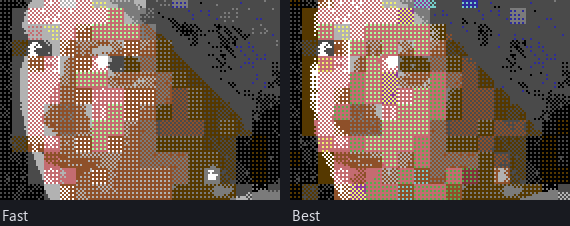
The formats it applies to
- Hires bitmap and Multicolor bitmap (Koala): Best refines every cell's colors, and for Koala the background (below).
- Hires FLI (AFLI), Multicolor FLI, Hires FLI + sprites and Multicolor FLI + sprites: each format's cells, by its own search.
- Multicolor, background per 4 × 1 (SuperCPU): its cells, by its own search.
The other formats have one way to convert, and no Quality setting.
What Best does
The fast conversion picks each cell's colors once, for how the dither will mix them. Best goes further:
- In multicolor, it tries every allowed color as the background (the fast conversion tries the four colors most of the picture is nearest to), unless you fixed the background.
- For each cell it ranks the 32 best sets of colors, not just the one.
- It then goes over the whole picture three times. For each cell it tries the next best sets, dithers the cell again with each, and keeps the one that makes the picture look closest to the source.
Because a cell's dither reaches its neighbors, each choice is judged in its place in the picture, not on its own. The result is the same on any computer.
Looking closest to the source
"Closest" is judged by how the two pictures look on a screen at a normal viewing distance, not pixel by pixel. Both are blurred the way the eye blurs them: brightness hardly at all (the eye sees single hires pixels), color much more (it can't tell the hues of single pixels apart), then compared.
So a dither is judged by the light it gives off: black and white in a checkerboard look light gray, as on a screen. Flat banding isn't rewarded for having no noise, and a noisy dither isn't rewarded for being right on average.
The same measure picks the better of two ways to choose an ordered dither's cell colors, in every quality: see Dithering.
How long it takes
Fast conversions take a few milliseconds to about a tenth of a second, so the picture follows a slider as you drag it: Koala and hires well under 100 ms.
Best takes longer. Measured on a desktop PC, for a whole picture:
| Format | Fast | Best |
|---|---|---|
| Multicolor bitmap (Koala) | about 40 ms | 0.25 to 0.35 s |
| Hires bitmap | 10 to 20 ms | 0.3 to 0.45 s |
| Hires FLI + sprites, Multicolor FLI + sprites | 40 to 100 ms | 0.45 to 0.7 s |
| Multicolor FLI, SuperCPU | 60 to 100 ms | 0.6 to 1 s |
| Hires FLI (AFLI) | 40 to 60 ms | 1.1 to 1.7 s |
The error diffusion dithers take a little longer than the two-color mixes. That's why Auto waits for you to pause.
Refining and your edits
Your hand edits go on top of the conversion. Once you paint over the fast conversion, Auto stops refining: the refined picture could give the cells under your edits other colors. The line under the buttons says so. Your next settings change refines again.
If you painted on the refined picture, Mosaicus keeps the refined picture under your edits.
Exports and programs take the picture as it shows.
Related pages
- Dithering: Best refines the cells for the dither you chose.
- Palettes and colors: fixing the background.
- Cell limits: what the cells allow.