Exporting
File ▸ Export… (Ctrl+E) saves the picture in another form: a file a C64 paint program opens, data for your own code, a PNG, or a C64 program that shows it. The dialog lists only what the picture can be saved as exactly, so whatever you choose holds every pixel as you see it.
To keep working on the picture later, save the project instead (File ▸ Save project): an export keeps only the pixels, not the source, the settings or the history.
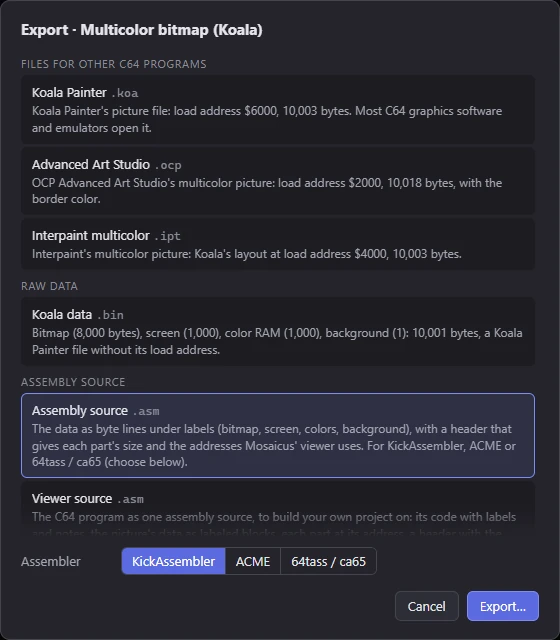
The Export dialog
The dialog's title names the picture's format. Below it, the exports are listed in groups:
- Files for other C64 programs: paint programs' picture files, and SpritePad and CharPad projects.
- Raw data: the format's own bytes, as a .bin (and, for a sprite sheet, a charset logo or a picture in characters, its parts alone).
- Assembly source: the data as source code, and the viewer program as source.
- Picture: PNGs.
- C64 program: a .prg that shows the picture.
Each entry has its name, its file extension and a line on what this picture's file holds: its layout, its load address and its size in bytes. Choose one and click Export….
- In the app, the save dialog suggests a folder beside the project, or else beside the picture it came from. If the name would be the source picture's own (a PNG made from photo.png), Mosaicus puts .c64 in it (photo.c64.png). It never writes over the source picture or the project file.
- In a browser, the file is downloaded.
- The status bar says where the file went.
Some exports have options below the list: the Assembler for assembly source, and the Scale and Pixel shape for PNG as shown on screen. The dialog remembers your choices for next time.
A floating piece, or a fill waiting for its cell choice, is placed first: the export has the picture as the canvas shows it.
Clashing cells
When cells use more colors than the format allows (a hand edit can do that), the dialog warns: 3 cells use more colors than Multicolor bitmap (Koala) allows. Exported files recolor them to the nearest colors the cell can have. Each such cell keeps the colors most of its pixels have, and the other pixels take the nearest of them: what a C64 would show. The PNGs show the same. To fix them yourself first, see Cell limits and clashes.
A charset logo or a picture in characters that needs more characters than its charset holds can't be exported as data, a program or a CharPad file until it fits: the dialog says how many too many (Pictures in characters).
Files for C64 paint programs
These are the picture files classic C64 paint programs saved, with their load address: any emulator or C64 graphics viewer that knows the program opens them.
| Format | Files |
|---|---|
| Multicolor bitmap (Koala) | Koala Painter (.koa): load address $6000, 10,003 bytes. Most C64 graphics software and emulators open it. Advanced Art Studio (.ocp): load address $2000, 10,018 bytes, with the border color. Interpaint multicolor (.ipt): Koala's layout at load address $4000, 10,003 bytes. |
| Hires bitmap | Art Studio (.art): load address $2000, 9,009 bytes, with the border color. Doodle! (.dd): uncompressed, load address $5C00, 9,218 bytes, the screen first. Hi-Eddi (.hed): load address $2000, 9,218 bytes, the screen at $4000. Interpaint hires (.iph): load address $4000, 9,002 bytes. |
| Multicolor + sprites, Hires + sprites | The Koala or hires files above, but only while the picture has no sprites: then its bitmap is the whole picture. |
| Hires FLI (AFLI) | AFLI (.afl): AFLI-editor's file, load address $4000, 16,385 bytes (eight screens, the bitmap at $6000). |
| Multicolor FLI | FLI Designer (.fli): FLI Designer's file (color RAM, eight screens, the bitmap), load address $3C00, 17,409 bytes. It has no background color, so it's offered only when the picture's background is black. Blackmail FLI (.bml): FLI Graph's file (FLI Graph is Blackmail's program), load address $3B00, 17,474 bytes, with a background color for each line. |
| Sprite sheet (multicolor) | SpritePad project (.spd): the sprites and their colors, a version 1 file (SpritePad 2.0's), for SpritePad, Spritemate and C64 Studio. |
| Hires, Multicolor and ECM characters | CharPad project (.ctm): the charset, the map and each character's color (per-character coloring), a version 7 file for CharPad 2.7 or later and C64 Studio. Offered when every character shows in one color in all its cells (in ECM, every character on each background; always with Colors: Per character). |
| Charset logo | CharPad project (.ctm): the charset and the screen map, a version 7 file for CharPad 2.7 or later and C64 Studio, the letters white and the ink black. |
The files that store a border color get the picture's background color as their border (black for hires).
In an AFLI file, other viewers show garbage or nothing in the left 24 pixels: the FLI bug.
Formats with no paint program's file
Hires FLI + sprites, Multicolor FLI + sprites, the C64 Ultimate formats and the SuperCPU format are Mosaicus' own: no other program's file can hold them. Multicolor + sprites and Hires + sprites with sprites in them are the same, since a bitmap file can't hold sprites. For these, export the raw data, the PNG, or the C64 program.
Raw data (.bin)
The format's own data with no load address: what a program of your own loads. The dialog's line says exactly what's in it for this picture. In short:
| Format | The .bin holds |
|---|---|
| Multicolor bitmap (Koala) | Bitmap (8,000 bytes), screen (1,000), color RAM (1,000), background (1): 10,001 bytes, a Koala Painter file without its load address. |
| Hires bitmap | Bitmap (8,000 bytes) and screen (1,000): 9,000 bytes. |
| Hires FLI (AFLI) | The AFLI file without its load address (16,383 bytes): eight screens of 1,024 bytes, then the bitmap. |
| Multicolor FLI | The Blackmail FLI file without its load address (17,472 bytes): a background for each line, color RAM, eight screens, the bitmap. |
| Multicolor + sprites, Hires + sprites | The Koala or hires data, then $D025, $D026, the sprite count, and for each sprite a 6-byte record (position, color, kind, hardware sprite) and its 64-byte block. |
| The FLI + sprites formats | The bitmap, its four screens (and for multicolor, the color RAM and the background), $D025 and $D026, the 36 sprite bands' own colors and their 64-byte blocks, as Mosaicus' viewer reads them. |
| Sprite sheet | The sprites as 64-byte blocks, row by row, then $D025, $D026 and each column's own color. |
| Hires, Multicolor and ECM characters | The charset (256 or 64 characters, 8 bytes each), the screen map (a byte a cell; ECM: the background in bits 6-7), color RAM (a byte a cell; multicolor with bit 3 set), then $D021-$D024. |
| Charset logo | The charset (8 bytes a character), then the screen map: a character number for each cell, row by row. |
| The C64 Ultimate formats | The picture as its raced viewer reads it, column by column: two pixels a byte in the hires formats, a byte a pixel in the chunky ones, the band and the chunky parts in Hires band + chunky. |
| SuperCPU format (Multicolor, background per 4 × 1) | Bitmap, screen and color RAM as in Koala, then each line's 40 backgrounds: 18,000 bytes. |
Some formats have their parts as separate exports too:
- Sprite sheet: Sprites only (.spr), the sprites alone, 64 bytes each. Each sprite's 64th byte is its color byte, as in SpritePad's files: bit 7 multicolor, the low 4 bits its own color.
- Charset logo: Charset only (.chr) and Screen map only (.bin).
- Hires, Multicolor and ECM characters: Charset only (.chr), Screen map only (.bin) and Colors only (.bin).
The names of data files
Some data doesn't say what it is by its size alone, so its file name does: picture.hires16-320x200.bin, picture.mixed-h200-y80-120-2x2.bin, picture.chunky160.bin (-48 added for a 48 MHz picture), picture.ecm-40x25.bin, picture.mchars-40x25.bin (hchars, echars for hires and ECM characters), picture.spr-3x2.bin. A sprite sheet that isn't 8 sprites across or one row gets its grid in its SpritePad and sprites-only names too (picture.spr-3x2.spd). Keep that part of the name: it's how Mosaicus opens the file again.
The data of a picture with sprites over its bitmap or over FLI is named the same way (picture.ks-12.bin: a Multicolor + sprites picture with 12 sprites), but it can't be opened again: see Opening exports again.
Assembly source (.asm)
The same data as source code to include in your own program: the bytes as byte lines under labels (for a Koala picture: bitmap, screen, colors, background), with a header that gives each part's size. For Koala, hires, the two bitmap + sprites formats, the sprite sheet, the charset logo, the pictures in characters and the SuperCPU format, the header also gives the addresses and register values Mosaicus' viewer uses.
Choose the Assembler below the list (remembered for next time):
| Assembler | Labels | Bytes | Comments |
|---|---|---|---|
| KickAssembler | bitmap: |
.byte $00,… |
// |
| ACME | bitmap |
!byte $00,… |
; |
| 64tass / ca65 | bitmap: |
.byte $00,… |
; |
The start of a Koala picture's source for KickAssembler:
// Multicolor bitmap (Koala), 160 x 200: exported by Mosaicus for KickAssembler
// Mosaicus layout: plain
// 10,001 bytes in all, no load address:
//   bitmap           +0       8,000 bytes  the bitmap, cell by cell (8 bytes a 4 x 8 cell, 40 cells a row), ...
//   screen           +8000    1,000 bytes  a byte a cell, row by row: two of its colors (high, low nybble)
//   colors           +9000    1,000 bytes  color RAM, a byte a cell: its third color (low nybble)
//   background       +10000       1 bytes  the background color ($D021)
// Mosaicus' viewer: VIC bank 1 ($DD00 = $02), bitmap $6000, screen $4000 ($D018 = $08), colors copied to $D800, ...

bitmap:
    .byte $00,$00,$00,$00,$00,$00,$00,$00,$00,$00,$00,$00,$00,$00,$00,$00
The Viewer source, in the same group, is the whole C64 program as source: see Viewer source.
PNG
Two PNGs, for different uses:
- PNG, 1:1: one PNG pixel per C64 pixel, so a multicolor picture is 160 × 200 (a C64 shows each pixel 2 wide). For other tools that work on C64 pixels, and for opening in Mosaicus again.
- PNG as shown on screen: the picture as a screen shows it, wide pixels doubled: 320 × 200 at 1× for a full-screen picture with square pixels, times the Scale you choose: 1× to 4× (3× at first). Pixel shape: Square, PAL or NTSC (PAL makes it a little narrower and NTSC a quarter narrower, as those screens do); at first the picture's own pixel aspect when it's PAL or NTSC, else the shape you chose last (PAL the first time). Saved as
name.screen.png. For sharing and printing.
Both carry a note inside the file (the format, its size, the background, the palette, and where the sprites are), so Mosaicus opens either one again as exactly that picture. One exception: an as-shown PNG at 1× with the PAL or NTSC shape, of a picture whose pixels are a hires pixel wide (a Hires bitmap, say), reads back only approximately, since its pixels end up narrower than a PNG pixel. A PNG of an FLI + sprites picture opens as a picture to convert again: its sprites are placed again, and some cells may not fit.
C64 program (.prg)
A program that shows the picture. It's the same program Run ▸ In VICE and Run ▸ On C64 Ultimate send (see Running on a C64). What it needs depends on the format:
| Format | The program |
|---|---|
| Standard and enhanced formats | Shows the picture on any C64, PAL or NTSC, or an emulator. The FLI formats' programs run on a Drean too; on the first NTSC C64s (6567R56A) some of their pixels are wrong (see The FLI formats and Sprite overlays). |
| Sprite sheet | Shows the sprites edge to edge, as laid out on the sheet, over the transparent color. |
| Hires, Multicolor and ECM characters | Shows the picture centered on the screen in its character mode, the cells around it blank, the border in the background color. |
| Charset logo | Shows the logo centered on the screen, in extended color mode (ECM) or character mode, white letters on black ink. |
| C64 Ultimate formats at 64 MHz | Needs a C64 Ultimate or Ultimate 64 Elite-II with Turbo Control set to its turbo registers (C64U Turbo Registers; U64 Turbo Registers on an Ultimate 64 Elite-II), PAL or NTSC. The screen stays black for about 6 seconds while the turbo starts, then the picture shows; when the machine isn't running at 64 MHz, the program says so on the screen instead. |
| C64 Ultimate formats at 48 MHz | Made for the C64 Ultimate (tested) and the Ultimate 64 Elite-II (untested), with the same Turbo Control setting. The screen stays black for about 6 seconds here too. The program measures the speed first, and when it can't race the picture, says so on the screen. |
| SuperCPU format | Needs a SuperCPU set to Turbo (20 MHz); VICE's xscpu64 runs it. Without one, or at 1 MHz, it says so and returns to BASIC. Its timing was measured in VICE only: if the backgrounds look 8 pixels off on a real SuperCPU, + and - move them a step right or left, and T shows a test pattern (plain 8-pixel columns of one color each when the timing is right) and T again the picture. |
To change the program, or build on it, export its source: Viewer source.
Opening exports again
File ▸ Open picture… opens most exports as a picture to edit, every pixel the same:
- the paint programs' files, SpritePad and CharPad projects, sprites (.spr) and charsets (.chr);
- the PNGs (by the note inside them);
- the .bin data (by its size, and the layout in its name);
- the assembly source (by the Mosaicus layout: line in its header).
A few can't be opened, and Mosaicus says why: the C64 program, the viewer source, a screen map or colors alone, and the data of a picture with sprites over its bitmap or over FLI (it doesn't keep where the conversion put the sprites). Open that picture's project or its PNG instead. More on opening files is in Opening pictures.
Related
- Viewer source: the C64 program as source to build on.
- Running on a C64: VICE and the C64 Ultimate.
- Formats: what each format is.
- Command line: converting without the app.