Formats
Mosaicus makes 19 C64 picture formats, each with its own size, pixel shape and rules for which colors may sit next to each other. This page explains what a format is, lists them all, and helps you choose one.
- Standard formatsHires, Multicolor (Koala), Hires FLI (AFLI) and Multicolor FLI: the classic formats any C64 shows.
- Bitmaps with spritesHires or multicolor bitmaps, and FLI, with sprites over or behind them for more color.
- Sprite pinsThe Sprites tool: choose, move, add and pin the sprites of Hires + sprites and Multicolor + sprites.
- Pictures in charactersHires, multicolor or ECM characters: a charset, a screen map and colors, fitted into 256 (or 64) characters.
- Charset logoA two-color logo fitted into a charset, in extended color mode or plain characters, with a character editor.
- Sprite sheetMulticolor sprites for games and demos: four color roles, an own color for each column.
- C64 Ultimate formatsAny of the 16 colors on every pixel, raced at 64 or 48 MHz on a C64 Ultimate or Ultimate 64 Elite-II.
- SuperCPU formatMulticolor with a background color of each 4 × 1 cell's own, rewritten 40 times a line at 20 MHz.
What a picture format is
How many colors a picture's pixels can have, and where, depends on the format:
- Resolution and pixel shape. A hires picture uses all 320 × 200 pixels. A multicolor picture has 160 × 200 pixels, each twice as wide as it is tall: the Format panel marks these formats wide pixels. Mosaicus always shows a picture in its true shape, so a multicolor picture looks right on the screen even though it has half the pixels across.
- Cells and their colors. The C64 doesn't keep a color for every pixel. It splits the screen into small blocks, called cells, and keeps a few colors for each cell. In a hires picture each 8 × 8 cell has two colors: every pixel in it is one of the two. In a multicolor (Koala) picture each 4 × 8 cell has three colors of its own, plus one background color shared by the whole picture.
- Clashes. A cell that would need more colors than its format allows is a clash. The converter never makes one: it chooses each cell's colors and dithers within them. You can paint one by hand, though; Mosaicus outlines clashing cells and shows them the way the C64 would (Cell limits and clashes).
The tricks that give C64 pictures more color all work on those limits: FLI changes the cell colors on every line or every second line, sprites lay extra colors over or under the bitmap, and the C64 Ultimate's 64 MHz turbo changes a color register for every pixel.
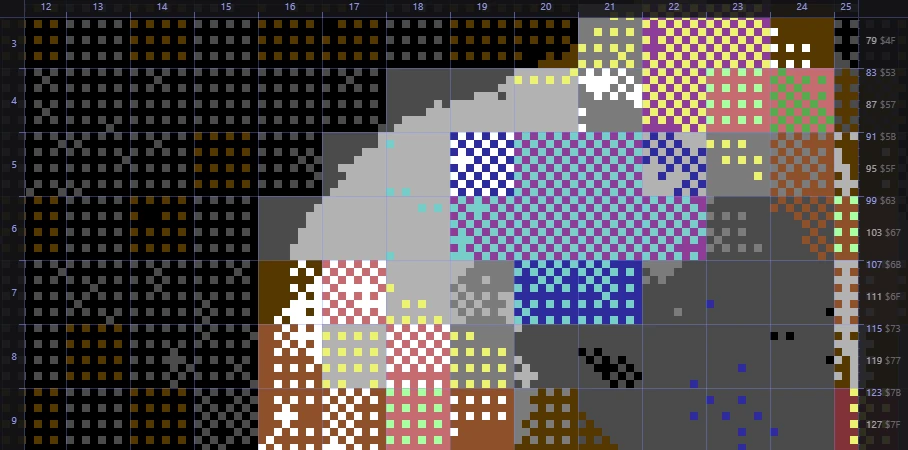
Turn on View ▸ Format guides (cells, chars, sprites) (Ctrl+;) to see a format's cells over the picture, with the screen's character rows and columns and the raster lines around it.
Every format
The Format panel's list groups the formats as this table does. Sizes are in the format's own pixels; wide pixels are twice as wide as tall. C64U is the C64 Ultimate, U64 Elite-II the Ultimate 64 Elite-II.
| Format | Size | Colors | Needs | Page |
|---|---|---|---|---|
| Hires bitmap | 320 × 200 | 2 per 8 × 8 cell | Any C64 | Standard |
| Multicolor bitmap (Koala) | 160 × 200 wide | Background + 3 per 4 × 8 cell | Any C64 | Standard |
| Hires FLI (AFLI) | 296 × 200 | 2 per 8 × 1 cell | PAL or NTSC C64 | Standard |
| Multicolor FLI | 148 × 200 wide | Background + 2 per 4 × 1 cell + 1 per 4 × 8 | PAL or NTSC C64 | Standard |
| Hires + sprites | 320 × 200 | Hires + up to 64 sprites behind | Any C64 | With sprites |
| Multicolor + sprites | 320 × 200 | Koala + up to 64 sprites over | Any C64 | With sprites |
| Hires FLI + sprites | 320 × 200 | 2 per 8 × 2 cell + a sprite grid | PAL or NTSC C64 | With sprites |
| Multicolor FLI + sprites | 160 × 200 wide | FLI (every second line) + a sprite grid | PAL or NTSC C64 | With sprites |
| Hires characters | Up to 320 × 200 | Background + 1 per 8 × 8 cell, in 256 characters | Any C64 | Characters |
| Multicolor characters | Up to 160 × 200 wide | 3 shared + 1 (0-7) per 4 × 8 cell, in 256 characters | Any C64 | Characters |
| ECM characters | Up to 320 × 200 | 1 of 4 backgrounds + 1 per 8 × 8 cell, in 64 characters | Any C64 | Characters |
| Charset logo (ECM) | Up to 320 × 200 | 2, in 64 or 256 characters | Any C64 | Charset logo |
| Sprite sheet (multicolor) | Up to 8 × 9 sprites | Transparent + 2 shared + 1 per column | Any C64 | Sprite sheet |
| Hires, 16 colors per pixel | Up to 384 × 200 | Any on every pixel | C64U / U64 Elite-II, 64 MHz | C64 Ultimate |
| Hires 240, 16 colors per pixel | Up to 384 × 200 | Any on every pixel (1, 1, 2 wide) | C64U / U64 Elite-II, 48 MHz | C64 Ultimate |
| Hires band + chunky | 320 or 384 × up to 200 | Any on every pixel or block | C64U / U64 Elite-II, 64 or 48 MHz | C64 Ultimate |
| Chunky 160 × 200 | 160 × 200 wide | Any on every pixel | C64U / U64 Elite-II, 64 or 48 MHz | C64 Ultimate |
| Chunky 80 × 50 | 80 × 50 blocks of 4 × 4 | Any on every block | C64U / U64 Elite-II, 64 or 48 MHz | C64 Ultimate |
| Multicolor, background per 4 × 1 | 160 × 200 wide | 3 per 4 × 8 cell + a background per 4 × 1 | SuperCPU (20 MHz) | SuperCPU |
The Format panel's card under the list repeats the chosen format's size and rules. Its badges say wide pixels, or 4 × 4 blocks for Chunky 80 × 50, and Needs C64U / U64 Elite-II or Needs SuperCPU for the formats a stock C64 can't show. mosaicus formats on the command line prints the same list.
Choosing a format
Start from where the picture is going:
- To share it, or to load it in a C64 paint program: Multicolor bitmap (Koala) or Hires bitmap. Every C64 shows them, and Mosaicus exports them as Koala Painter, Art Studio, Doodle! and other paint programs' files. Multicolor suits photos and paintings (more colors, chunkier pixels); hires suits line art, text and sharp detail.
- For the most color a stock C64 can show: Hires FLI (AFLI) or Multicolor FLI change the colors on every line. They lose the screen's left 24 pixels to the FLI bug. The sprite formats add color with sprites instead, and the FLI + sprites formats cover the FLI bug with a sprite.
- For a demo or game: a picture in Hires, Multicolor or ECM characters (a title screen, a map, a logo in color), a Charset logo to scroll or recolor, or a Sprite sheet of multicolor sprites. Their exports are data for your own program (and CharPad or SpritePad files).
- For a C64 Ultimate or Ultimate 64 Elite-II: Hires, 16 colors per pixel shows any color on every pixel. It needs the Ultimate's turbo; VICE can't show it.
- For a SuperCPU: Multicolor, background per 4 × 1 gives a multicolor picture more colors per cell.
Not sure? Convert the picture in a few formats and compare. Changing the format takes a moment, and Undo brings the last one back.
TipTo paint from blank instead of converting, choose File ▸ New picture… (Ctrl+N): it lists the same formats, grouped the same way (Painting from blank).
Changing the format of an open picture
Choose another format in the Format panel's list. The picture converts again in the new format, as one undo step.
What carries over:
- Your settings: the framing, adjustments, palette, allowed colors, dithering and quality stay as they were. Each format's own options (its Background, its sprite options and so on) are kept with the picture too, and come back when you return to that format.
- The size: the new format starts at its own size. For the formats whose size you can choose, that is the size in its card (320 × 64 for a charset logo, for example).
- Hand edits: they go to the new format, and a note says so. Where the new format covers the same part of the screen (Hires and Multicolor, for example), each edit stays at the same spot. Where it covers another size of the screen (Hires FLI's 296 pixels, or a Chunky 80 × 50), the edits are scaled with the picture as the framing places it, and a note says how many edited pixels there were and are now. (A picture painted from blank has no framing: its edits stay at the same spot of the screen.) Edits that end up outside the new picture are counted in a note too.
- The sketch layer and saved selections go where the edits go.
The new format's rules apply to the edits as soon as they arrive. A pixel that its cell can't show in the new format makes that cell a clash: it is outlined, and Edit ▸ Recolor clashing cells recolors every clashing cell as the C64 would show it (Cell limits and clashes).
Related pages
- Framing: crop or fit the source into the format's size and pixel shape.
- Exporting: the files each format can be saved as.
- Running on a C64: VICE, or a C64 Ultimate over the network.