The CRT model
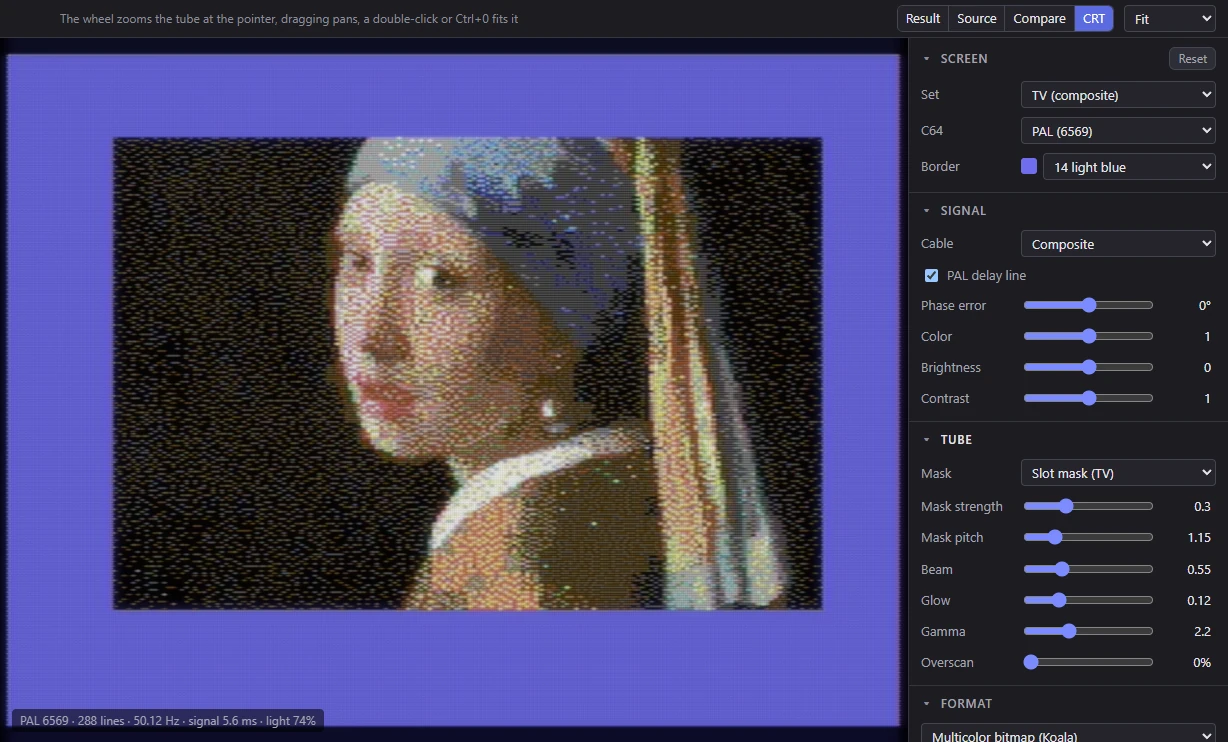
C64 pictures were made for TVs, and a TV doesn't show sharp square pixels. Colors bleed into each other, fine dithers blend into new shades, dark gaps run between the lines, and a phosphor pattern sits over everything. Many C64 artists counted on that. The CRT view and the Preview's CRT TV mode show your picture through a model of the whole path: the C64's video chip, the cable, the TV's decoder and the picture tube.
To see it, choose View ▸ CRT (Alt+4). Its settings sit at the top of the side panels in three panels: Screen, Signal and Tube. Signal and Tube start folded.
How to move around in the view (zoom, pan, Fit) is in The views.
How the model works
The model follows the signal the way it really travels, in two stages.
The signal. The TV's screen is built as the C64 draws it: the picture in the middle of the screen, the border around it, the edges the TV can't show. Each pixel's color (from the palette the picture uses) becomes a video signal: a brightness part (luma) and a color part (chroma) carried on a color subcarrier, sampled finely enough that each hires pixel is a whole number of samples. Then the signal is sent down the chosen cable and decoded by the TV, with the same filters a real set uses. This is where color bleeding, fringes on fine detail and the NTSC dot crawl come from. It's made again when the picture or a Signal setting changes, in a few milliseconds.
The tube. The decoded signal becomes light on the glass: each line a beam whose height grows with its brightness, the phosphor mask over it, and halation (a glow spreading in the glass). This stage runs on your graphics card, so the Tube settings, zoom and pan change the view at once.
Nothing clips. Where a thin beam would need more light than the screen's white, the whole picture is dimmed instead, as a real tube's brightest point limits it. The line in the view's corner says how much light the tube passes (light 74%).
Screen
| Setting | Choices | What it does |
|---|---|---|
| Reset (button) | Every CRT setting back to its default. | |
| Set | TV (composite), TV with comb filter (NTSC), Monitor (S-Video, 1702-style), Clean RGB (reference) | A signal path and the tube that usually came with it, in one choice. Changing a setting it sets shows Custom. |
| C64 | PAL (6569), NTSC (6567R8), NTSC, early (6567R56A) | The C64's video chip: it decides the TV standard, the timing and the dot crawl. PAL at first. |
| Border | the 16 colors | The border color around the picture. Light blue (14) at first, as a C64 starts up. |
| Dot crawl | Moving, Blended, Still | Only with the NTSC 6567R8 on a composite cable (below). |
What each Set chooses:
| Set | Cable | Decoder | Mask | Mask pitch |
|---|---|---|---|---|
| TV (composite) (the default) | Composite | Notch filter | Slot mask, 0.3 | 1.15 |
| TV with comb filter (NTSC) | Composite | Comb filter | Shadow mask, 0.3 | 1.15 |
| Monitor (S-Video, 1702-style) | S-Video | Notch filter | Slot mask, 0.3 | 1.6 |
| Clean RGB (reference) | RGB | None |
The C64's chip and the dot crawl
- PAL (6569): the European C64. 312 lines a frame at about 50 frames a second.
- NTSC (6567R8): the usual American C64. Its timing flips the color subcarrier every line and every frame, so on a composite cable the color fringes along fine detail move from frame to frame: the dot crawl. It's the only chip here that has it (the C64C's 8562 has the same timing).
- NTSC, early (6567R56A): the first NTSC C64s, with a slightly shorter line. Its fringes stand still.
Dot crawl chooses how the view shows the 6567R8's two alternating frames: Moving (animated at the C64's frame rate, as on a TV), Blended (the two frames averaged: what the eye makes of it), or Still (one frame). The Preview's CRT TV doesn't animate it: it shows one frame, or the blend with Blended.
Signal
| Setting | Range or choices | Default | Shown |
|---|---|---|---|
| Cable | Composite, S-Video (Y/C), RGB (no encoding) | Composite | always |
| Decoder | Notch filter (most TVs), Comb filter (better TVs) | Notch | NTSC 6567R8, composite |
| Color bandwidth | Consumer TV (0.6 MHz), Broadcast I/Q (1.3/0.5 MHz) | Consumer TV | NTSC, not RGB |
| PAL delay line | on or off | on | PAL, not RGB |
| Phase error | -30° to 30° | 0° | not RGB |
| Color | 0 to 2 | 1 | always |
| Brightness | -0.3 to 0.3 | 0 | always |
| Contrast | 0.5 to 1.5 | 1 | always |
Cable. How the C64 is connected:
- Composite: brightness and color on one wire, as through the RF or the composite (video) socket. The TV has to separate them again, and can't do it perfectly: fine detail turns into false color, and color bleeds into detail. This is the classic C64 look.
- S-Video (Y/C): brightness and color on separate wires, as with a monitor like the Commodore 1702 on its separate inputs. No cross-talk between them; the color is still softer than the detail.
- RGB (no encoding): no video signal at all, just the palette's colors on the tube. A reference to compare the others with. (A stock C64 has no RGB output.)
Decoder. How a composite TV separates color from brightness:
- Notch filter: takes the band around the color carrier out of the brightness. Most TVs did this: fine detail at that frequency is lost and its color shows as fringes.
- Comb filter: compares each line with the line above, where the NTSC carrier is flipped, and so separates them more cleanly. Better TVs had one. It needs the 6567R8: with the 6567R56A, whose carrier doesn't flip line to line, a comb filter can't separate them, so the choice isn't offered and the set uses the notch filter.
Color bandwidth. How sharp an NTSC set's color is. Consumer TV keeps 0.6 MHz of color detail, as most home sets did. Broadcast I/Q keeps 1.3 MHz along one color axis and 0.5 MHz along the other, as the NTSC standard allows. (A PAL set keeps 1.1 MHz.)
PAL delay line. A PAL set averages each line's color with the line before. A phase error then changes the saturation a little instead of the hue. Off, a phase error shows as alternating bars of different hues (Hanover bars).
Phase error. A badly adjusted set: hues shift on NTSC, bars appear on PAL without the delay line.
Color, Brightness and Contrast are the set's own knobs: the saturation, the black level and the gain.
Tube
| Setting | Range or choices | Default |
|---|---|---|
| Mask | Slot mask (TV), Aperture grille, Shadow mask (dots), None | Slot mask |
| Mask strength | 0 to 1 | 0.3 |
| Mask pitch | 0.8 to 2.5 | 1.15 |
| Beam | 0.2 to 1.5 | 0.55 |
| Glow | 0 to 0.5 | 0.12 |
| Gamma | 1.8 to 3 | 2.2 |
| Overscan | 0% to 12% | 0% |
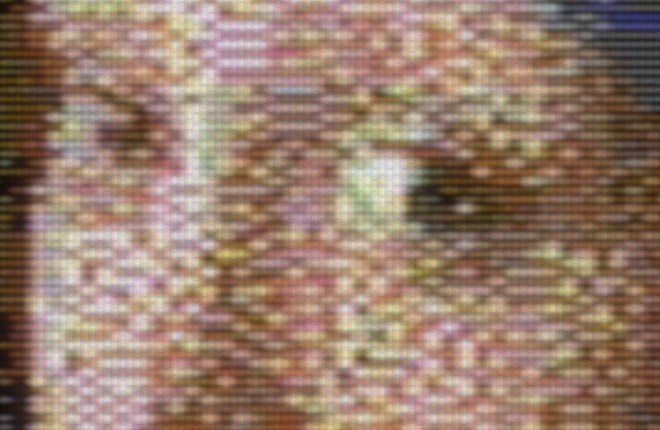
Mask. The pattern of red, green and blue phosphors on the glass:
- Slot mask (TV): short vertical slots in staggered rows, as most TVs had.
- Aperture grille: unbroken vertical stripes, as in Trinitron tubes.
- Shadow mask (dots): a pattern of dots, as in many monitors.
- None: no pattern: the light only.
Mask strength is how much the pattern shows: 0 hides it, 1 shows it fully. Mask pitch is how fine it is, in phosphor triads per hires pixel: a TV about 1.15, a 13 or 14 inch monitor about 1.6. Both are hidden with None.
Beam. The size of the electron beam's spot. Each line is drawn as a beam taller in its middle than at its edges, and it grows with brightness: bright lines spread into the dark gaps between the lines, dark ones leave them open. A small beam shows strong scan lines (and dims the picture, so that nothing clips); a big beam fills the gaps.
Glow. Halation: light spreading in the glass around bright areas, a soft haze a few lines wide. 0 turns it off.
Gamma. The tube's response from signal to light. 2.2 keeps the palette's colors as they are; higher darkens the midtones, as an older tube does.
Overscan. How much of the picture the tube's edges hide, on each side. A real TV hid part of the border; at 0% you see the whole screen. It also magnifies the picture over the mask, as on a real set.
Where the settings apply
- They describe your screen, not the picture: they're remembered on your computer for every picture, and not saved in projects.
- The Preview's CRT TV mode uses the same settings, and so does a popped-out preview window: a change shows in both.
- The CRT always uses the picture's own palette, and the shape of the chosen TV standard's pixels, whatever the picture's pixel aspect is set to.
- The CRT view shows the picture as it will be exported, with no sketch, overlays or checks. In the plain FLI formats, the FLI bug's columns at the left show as a C64 shows them: light gray in AFLI, the background color in multicolor FLI.
Related
- The views: the CRT view, its zoom and its info line.
- Preview: the CRT TV beside your work.
- Palettes and colors: the palette the signal is made from.
- Running on a C64: the real thing.