Pictures in characters
A picture in characters is made of 8 × 8 characters, as the C64's text screen is: a charset (the characters' shapes), a screen map (which character goes in each cell) and color RAM (each cell's own color). It is how games draw their title screens, maps and logos.
Mosaicus makes one in each of the C64's three character modes, from any picture or from blank:
| Format | Cell | Colors | Characters |
|---|---|---|---|
| Hires characters | 8 × 8 | One background ($D021) for the whole picture, one color of each cell's own (any of 16) |
256 |
| Multicolor characters | 4 × 8 wide pixels | Three colors for the whole picture ($D021, $D022, $D023), one of each cell's own (colors 0-7) |
256 |
| ECM characters | 8 × 8 | Each cell one of four backgrounds ($D021-$D024) and one color of its own (any of 16) |
64 |
A character holds only a shape; its colors are the cell's. Two cells of the same shape in different colors share one character, so a picture often needs fewer characters than it has cells. The limit that matters is the charset: 256 characters (in ECM, 64). Mosaicus fits the picture into it, merging the characters whose cells change least by it (mostly the rarest), and the Characters panel and the Snap tool then let you touch it up by hand.
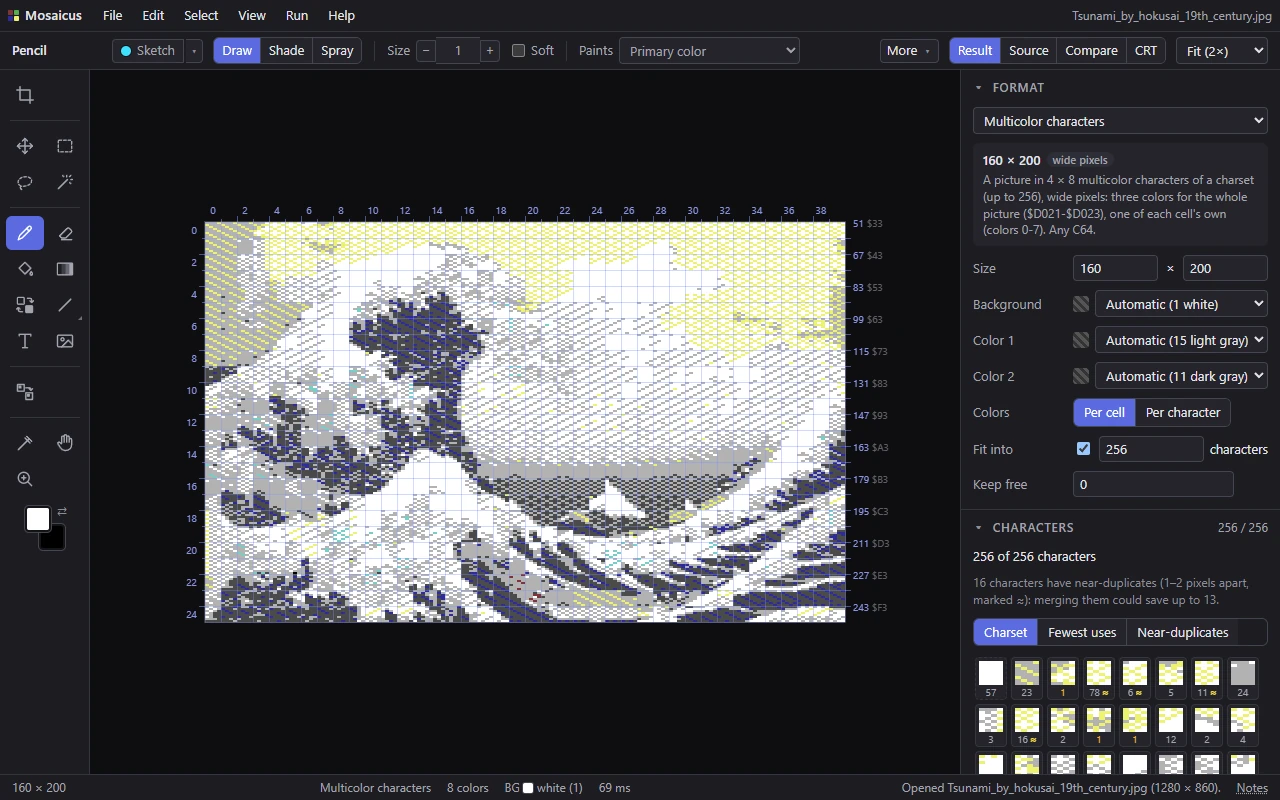
Choose the mode by what the picture needs. Multicolor gives the most color (four in every cell) at half the resolution across; hires keeps every pixel sharp; ECM gives each cell its choice of four backgrounds, at the cost of a charset of 64 characters.
NoteIn multicolor character mode a C64 can also show any cell as a hires cell (two colors, 8 pixels across). Mosaicus' Multicolor characters are multicolor in every cell.
For a two-color logo made to be recolored by your own program, line by line, see Charset logo instead.
The Format panel's options
- Size: the picture's width and height, in steps of a cell, up to 40 × 25 cells (320 × 200; 160 × 200 wide pixels in multicolor). It starts at a whole screen; a picture you open that fits in a screen sets the size itself, one source pixel per pixel (two across for multicolor's wide pixels), and is fitted inside.
- Background (hires), Background, Color 1 and Color 2 (multicolor), or Background 1 to Background 4 (ECM): the colors the whole picture shares. Automatic (the default) lets the converter choose them, and says which it chose: Automatic (1 white). Set one to keep it. On a blank picture, Automatic gives the background the fill color and the others dark gray, gray and light gray.
- Colors: Per cell (the default): each cell has its own color in color RAM, and cells of one shape in any colors share a character. Per character: each character has one color everywhere it shows, as CharPad's per-character coloring has it; a shape in two colors is then two characters. In ECM characters the color goes with the background, as the screen code holds both: a shape is one character in up to one color on each of the four backgrounds, and takes another only for a second color on the same background. Choose it for a game whose characters keep their colors, or to export a CharPad project that holds any picture.
- Fit into N characters (on by default, 256 or 64): merge the characters whose cells change least by it (mostly the rarest) until the picture fits this many; each cell changed then takes the nearest character kept. The count includes the characters kept free and the blank one. Set it lower to leave room for characters of your own; turn it off to see the picture with every character it has.
- Keep free (default 0): characters at the start of the charset left blank for your program.
Every charset Mosaicus makes starts with the characters you keep free, then a blank character (all background), which is always there, then the others in the order the cells first show them, row by row.
In the Colors & dither panel, the allowed colors and dithering apply (there is no Quality choice). A flat logo or pixel art fits best with None; a dithered photo has many more different cells to fit.
Painting
What each cell can show:
- Hires characters: the background and one color of its own.
- Multicolor characters: the three shared colors and one of its own, from colors 0-7.
- ECM characters: one of the four backgrounds and one color of its own.
A cell that can't show as painted is a clash, outlined red: two colors of its own, a multicolor cell's own color past 7, or an ECM cell of two colors neither of which is one of the four backgrounds (or of three colors or more). An ECM cell all in one color that isn't a background is fine: it shows as a full character in that color. The Characters panel counts these cells, and Edit ▸ Recolor clashing cells gives each the nearest it can show. With Cell limits set to Recolor cells or Keep cell colors, a stroke that would make a clash is recolored or refused, and a refusal's message says what each cell can show (Cell limits and clashes).
The other clashes are cells whose characters the charset has no room for: when the picture needs more characters than the charset holds, the cells of the rarest are outlined red too (of those, first the ones you painted). The status bar counts the two kinds apart. Recoloring can't fix those; merge or edit characters, or snap cells, instead. Until the picture fits, its data, program and source can't be exported or run, and no CharPad project is offered.
The Characters panel
The Characters panel lists every character the picture uses, each drawn in its colors (those of the first cell that uses it, or with one color per character, its own), with the number of cells that use it. Its header counts the characters against the limit (231 / 256), and the count follows every stroke as you paint it. It works as for a charset logo: order the list by Charset, Fewest uses or Near-duplicates, point at a character to mark its cells, and click one to edit it or merge its near-duplicates into it (1-2 pixels apart, marked ≈).
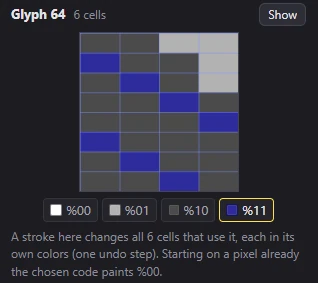
In the character editor a stroke changes every cell that uses the character, as one undo step, and each cell keeps its own colors: the shape changes, not the colors. (With one color per character, the character's color.)
- Hires and ECM characters: a click flips a pixel between the cell's color and the background; a drag paints every pixel it passes the same way.
- Multicolor characters: the four buttons under the editor choose what a stroke paints: %00
$D021, %01$D022, %10$D023, %11 each cell's own color. A stroke that starts on a pixel already in the chosen code paints %00 instead.
A merge works the same way: the merged cells take the other character's shape and keep their colors (with one color per character, they take its color too; in ECM its color on their background, keeping their own on a background it isn't on yet). The blank character is always in the charset and isn't edited here.
The Snap tool
The Snap tool (N) fixes cells on the picture. Click a cell whose character no other cell has: it takes the nearest character another cell already has, or the blank one, with the fewest pixels changed, and keeps its colors (with one color per character, it takes that character's color). The picture then needs one character fewer, and a message says how many pixels changed. A cell that shares its character, or is blank, stays as it is, and a message says so. Alt+click a cell to choose its character in the Characters panel.
Its options bar counts the glyphs against the charset, and the cells with a character of their own (each costs a character): Show flashes them, Snap all snaps each to the nearest character at least two other cells use (or the blank one), as one undo step. N cells changed to fit are the cells the Fit into merging changed; Show flashes them. With the Snap tool in hand, the format guides outline the cells with a character of their own (orange, dashed).
What it exports as
- CharPad project (
.ctm): the charset, the map and the colors, for CharPad 2.7 or later and C64 Studio, with CharPad's per-character coloring. It is offered when every character shows in one color in all its cells (in ECM, every character on each background), which is always the case with Colors: Per character (otherwise the Export dialog says why it isn't offered). (CharPad Free recognizes an ECM project but doesn't edit ECM.) - Charset, screen and colors (
.bin): the charset (256 or 64 characters, 8 bytes each), the screen map (a byte a cell, row by row; in ECM the character in bits 0-5 and its background in bits 6-7), color RAM (a byte a cell; multicolor with bit 3 set), then$D021-$D024. The file name keeps the cell grid (NAME.mchars-40x25.bin), so Mosaicus can open it again. - Charset only (
.chr), Screen map only (.bin) and Colors only (.bin). A.chropens again as a charset logo: to get the picture back, open the.binor the CharPad project. - Assembly source, PNG, a C64 program and its viewer source. The program shows the picture centered on the screen in its mode, the cells around it blank, the border in the background color, on any C64, PAL or NTSC.
See Exporting.
Opening characters
File ▸ Open picture… opens a CharPad project (.ctm, CharPad 2.0 on, a map of up to 40 × 25) as a picture in its mode, with its colors (per map, per tile or per character) and its shared colors set in the Format panel, so the picture shows exactly as it did. Its characters don't keep the file's numbers: Mosaicus numbers them in the order the cells first show them. Fit into is set to the whole charset and Keep free to the blank characters before the first drawn one, less one (the last of them becomes the blank character); Colors is Per character when the file colors per character and has a shape twice, and for any ECM project colored per character: CharPad's colors there go with each character's background, as Mosaicus' do. A CharPad project in a charset logo's colors (white backgrounds, a black character color, one color for the whole map) opens as a charset logo. A multicolor project's hires cells open with their pixels in pairs, and a note says how many. Mosaicus' own .bin and assembly source open again too (Opening pictures).
Related pages
- Charset logo: a two-color logo in characters, for raster recoloring.
- Cell limits and clashes: painting within what each cell can show.
- Exporting: the files and their layouts.