Projects and saving
A project keeps a picture as you left it: the settings, your hand edits and the source picture it is converted from, so you can come back and keep changing any of them. Exports are for the C64; projects are for Mosaicus.
What a project holds
A project is a .mosaicus file. It holds:
- every setting: the format, framing, adjustments, palette and colors, dither and quality;
- where the source picture is (see below);
- your hand edits;
- the sketch layer (Sketch layer);
- your saved selections (Saved selections);
- for a picture opened from a C64 paint program's file, that file's picture.
It doesn't hold the undo history: a project you open starts with an empty history.
The source picture stays outside
The project names its source picture; it doesn't copy it. It keeps the picture's place relative to the project
(when the picture is near it: in its folder or below, or in a folder reached from at most three folders
up) and its full path, and looks in both
when it opens. Keep the source picture with the project: if you move both together, the project still finds it.
A picture in your home folder is named from it (~/Pictures/starry.jpg), so a project you give someone doesn't
carry your user name; on their computer it looks in their home folder.
Save
- File ▸ Save project (Ctrl+S) saves to the project's file. The first time, it asks
where, and suggests the source picture's name and folder (
starry.jpgbecomesstarry.mosaicusbeside it). - File ▸ Save project as… (Ctrl+Shift+S) saves under another name.
A floating piece, or a fill waiting for its cell choice, is put into the picture first, as the canvas shows it. The status bar says Saved and the path.
Mosaicus never saves a project over the picture it comes from (its source picture, or the C64 file it was opened from): it says so and asks for another name. If a save fails (a read-only file, a file another program has open, a drive that is gone), Mosaicus says why and offers Save as… to save it somewhere else.
Saves are all or nothing
A project is written to a temporary file beside it first (its name with .tmp added), then moved over the old
one in one step. If the computer crashes, the disk fills up or a drive goes away in the middle of a save, the
old project is still there as it was.
Unsaved changes
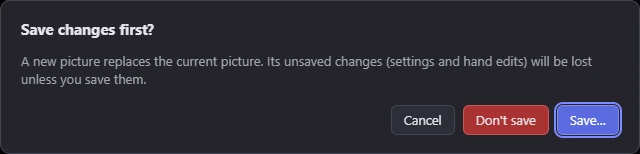
Opening another picture or project, starting a new picture, or closing the window asks first when the picture has unsaved changes (settings and hand edits).
Open
- File ▸ Open project… (Ctrl+Shift+O) opens a
.mosaicusfile. - File ▸ Open recent lists the last eight pictures, C64 files and projects you opened, newest first. Where two have the same name, their folder shows beside them; point at one for its full path. A file that isn't there any more is taken off the list when you choose it. The welcome card shows the five newest.
- Dropping a
.mosaicusfile on the window opens it too.
If parts of a project can't be read (its hand edits, its sketch, a saved selection, a C64 file's picture), the project opens without them, says which were left out, and counts as changed. A project saved by a newer version of Mosaicus, or a file that isn't a project, doesn't open, and the message says which it is.
A source picture that moved
When a project's source picture isn't where the project says, the project opens anyway, without it:
- The status bar says The source picture … wasn't found (or couldn't be read, with the reason).
- The Frame panel says so too, and its button becomes Find it…. It opens a file dialog in the folder where the picture was. Choose the picture (or another one) and it becomes the source again; your hand edits stay.
- Until then, the picture shows only your hand edits over a blank conversion, and the Frame tool can't be used. Saving keeps the missing picture's name and place in the project, so it can still be found later.
Recovery after a crash
While a picture has unsaved changes, Mosaicus keeps a copy of it every 30 seconds in its own folder (on
Windows %LOCALAPPDATA%\Mosaicus\recovery; on macOS ~/Library/Application Support/Mosaicus/recovery; on Linux
~/.local/share/Mosaicus/recovery). Each window keeps its own copy, so two windows never write over each other's.
If Mosaicus closes unexpectedly (a crash, a forced quit, a power cut), the next start asks about each copy left behind, newest first: Restore unsaved work? names the project (or the picture), how long ago the copy was made, and how many pixels were edited.
- Restore brings the work back as unsaved changes, to the project it belongs to (if it had one). Any other copies wait for the next start. The undo history isn't part of the copy.
- Discard it deletes the copy, and the next one is asked about.
- Cancel keeps the copy for the next start, and the next one is asked about.
A copy goes once its work is saved, replaced by another picture, or closed with Don't save. A window that is still open never offers another open window's copy.
What carries over to the next picture
Opening a picture to convert starts from the settings you had: the format, the palette and colors, the adjustments and the dither. The framing starts fresh, except the pixel aspect. When something that carried over changes how the new picture looks, the opening message says so, for example Kept from the last picture: its adjustments and its pixel aspect (PAL). It can name:
- its adjustments;
- its background (in the formats with one);
- its allowed colors;
- its pixel aspect (PAL or NTSC);
- its sprite count and its sprites' shared colors (in the sprite formats).
What one picture chose for itself goes back to your own choice for the next: the format and colors of a C64 file or a picture opened in its exact format, the settings Mosaicus picked for pixel art, and what Freeze conversion into edits fixed. A preset set to start every new picture applies first, and the message names it (see Presets).
Related pages
- Undo and history
- Exporting: files for the C64 and other programs
- Preferences