Preferences
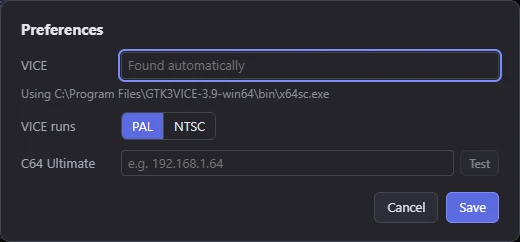
Preferences tell Mosaicus how to run your pictures: where the VICE emulator is, which TV standard it runs, and where your C64 Ultimate is on the network. Open them with File ▸ Preferences… (Ctrl+,).
Preferences are kept for your user account on this computer, not in projects.
VICE
Where VICE's C64 emulator, x64sc, is. Leave it empty and Mosaicus finds it: it looks on the system's PATH,
then in the usual places VICE is installed. On Windows that is VICE folders such as GTK3VICE-… in the Program
Files folders, your user folders, the drive roots and their \Programs folders, and the newest version found
wins. On macOS it looks in Homebrew's folders and Applications, on Linux in /usr/bin, /usr/local/bin and
/snap/bin.
To choose one yourself, type the path of x64sc (or of the VICE folder that holds it) or click Browse….
The line under the field says which program Mosaicus will use (Using …), or that VICE wasn't found, with
where to get it (vice-emu.sourceforge.io).
The SuperCPU format runs in VICE's xscpu64, which comes with VICE: Mosaicus looks for it beside x64sc and in the same places.
TipThe
MOSAICUS_VICEenvironment variable, set to the program or its folder, works too: Mosaicus checks it after this setting and before searching.
VICE runs
PAL (the default) or NTSC: the TV standard of the C64 that VICE emulates when you choose Run ▸ In VICE (F5). Pick the one your picture is for.
It also decides the standard the status bar's Raster time is shown for, when the picture's Pixel aspect is square (a PAL or NTSC pixel aspect shows its own standard, and the C64 Ultimate formats show both). See The window.
C64 Ultimate
The network address of your C64 Ultimate or Ultimate 64, for example 192.168.1.64. Its Web Remote Control Service (in the machine's Network Settings) must be enabled, with no Network Password set.
Run ▸ On C64 Ultimate (Shift+F5) sends pictures there; until an address is set, that
command opens Preferences and asks for it.
Test asks the machine at that address what it is, and says what it found: the product and its firmware version, and whether Turbo Control is set for the turbo formats. The C64 Ultimate formats need Turbo Control set to C64U Turbo Registers (U64 Turbo Registers on an Ultimate 64 Elite-II; in the machine's U64 Specific Settings); it powers up Off unless that setting is saved on the machine. If the machine doesn't answer, the reason shows instead.
See Running on a C64 and C64 Ultimate formats.
What else Mosaicus remembers
Some choices are kept without a dialog, for your user account on this computer:
- the Quality choice between Auto and Fast (Quality);
- which side panels are folded;
- the tools' options;
- the CRT view's settings, which describe your screen rather than the picture (The CRT model);
- the preview's state (Preview);
- the checking views' settings, such as the tracing's look (Checks);
- the Export dialog's choices of assembler, scale and pixel shape (Exporting);
- the recent files (File ▸ Open recent);
- your presets, in Mosaicus' own folder, shared by every project (Presets).