Sprite sheet
The Sprite sheet (multicolor) format turns a picture into C64 multicolor sprites. Draw or convert a character, a ship or a logo, and export the sprites for your own program, or for SpritePad.
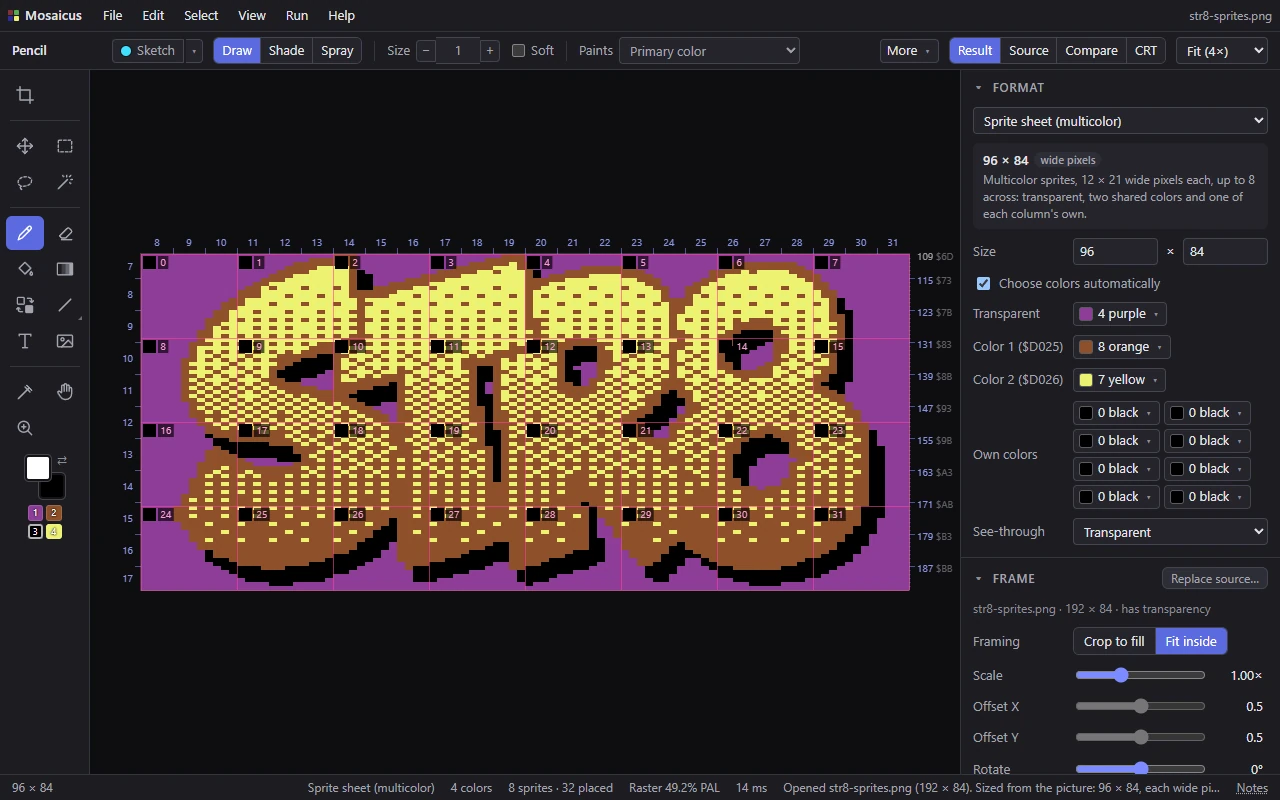
What a multicolor sprite is
A multicolor sprite is 12 × 21 pixels, each twice as wide as it is tall. Every pixel takes one of four roles:
| Role | Key | What it shows |
|---|---|---|
| Transparent | 1 | What is behind the sprite. Mosaicus gives it a color only so you can see and paint it. |
Color 1 ($D025) |
2 | A color all sprites share. |
| Own | 3 | The sprite's own color. |
Color 2 ($D026) |
4 | A second color all sprites share. |
A sheet is up to 8 sprites across (the C64's eight sprites side by side) and 9 down. To show a sheet more than one row tall, a program moves the same eight sprites down after each row, so all the sprites in a column are the same hardware sprite. In this format they share one own color: each column has its own.
The Format panel's options
- Size: the sheet's width and height in its pixels: the width in steps of 12 (one sprite) from 12 to 96, the height in steps of 21 from 21 to 189. It starts at 96 × 42 (8 sprites across, 2 down). A picture you open in this format sets the size itself when it fits a sheet, each wide pixel two source pixels across (rounded up to whole sprites), and is fitted inside.
- Choose colors automatically (on by default): the converter picks the role colors from the source. Color 1 is its most common color, each column's own color the most common in that column besides, Color 2 the next most common. When a color one column took as its own is the whole sheet's second (a logo's outline, say), Color 2 takes it instead and the columns' own colors come after, whichever keeps more pixels their own color. Every opaque pixel then takes the nearest of its column's three colors, so nothing in the drawing becomes a hole.
- Transparent, Color 1 ($D025) and Color 2 ($D026): the role colors. While Choose colors automatically is on, they show what the converter chose.
- Own colors: a swatch for each sprite column's own color (
$D027to$D02Eon the C64). A column's own color can't be one of the three shared role colors. - See-through: what the source's transparent parts become: Transparent (the default), Color 1 ($D025), Color 2 ($D026) or Own color.
What counts as transparent: the parts of the source that are see-through. A picture without transparency has its ground made transparent instead: the color most of its border has (when it covers at least half of the border), as far as it reaches in from the edges.
Changing a role's color
Choosing a role or column color by hand, or another See-through, turns Choose colors automatically off. That first change keeps what the converter chose for the other roles and columns, so only what you changed changes.
From then on, changing a role's color recolors that role's pixels: no pixel moves to another role, and your hand edits keep their roles in the new colors. Each change is one undo step. Turn Choose colors automatically back on to let the converter choose again.
Painting a sheet
A sprite sheet paints in its four roles, not the 16 colors:
- The Paint palette panel lists the four roles with their colors. Click one for the primary color, right-click for the secondary. The keys 1 to 4 pick the roles as the primary color, Shift+1 to 4 as the secondary.
- The toolbar's color well has the same four roles as small chips under it, and its color picker offers only them.
- Any color you paint becomes one of its column's four colors: a role's color stays as it is, another column's own color becomes this column's own color, and any other color its nearest of the four. So painting the Own role in any column paints that column's own color.
The Colors & dither panel has no allowed colors or dithering for a sheet: each source color goes to the nearest role.
View ▸ Format guides (Ctrl+;) draws each sprite's 12 × 21 box. When the boxes are large enough, each is numbered (across, then down, from 0) with a chip of its column's own color.
What it exports as
- SpritePad project (
.spd): the sprites and their colors for SpritePad 2.0 (a version 1 file), Spritemate and C64 Studio. - Sprites and colors (
.bin): the sprites' 64-byte blocks row by row, then$D025,$D026and each column's own color. - Sprites only (
.spr): the 64-byte blocks alone. Each sprite's 64th byte is its color byte, as SpritePad has it. - Assembly source, PNG, a C64 program (the sprites edge to edge over the transparent color) and its viewer source.
SpritePad files and .spr files keep no grid. When a sheet is neither 8 sprites across nor one row tall, the exported file's name records its width, so Mosaicus can open it again in the same shape. See Exporting.
Related pages
- Charset logo: the other format made for programs.
- Paint colors: the primary and secondary colors.
- Bitmaps with sprites: sprites over a whole picture.