Line colors
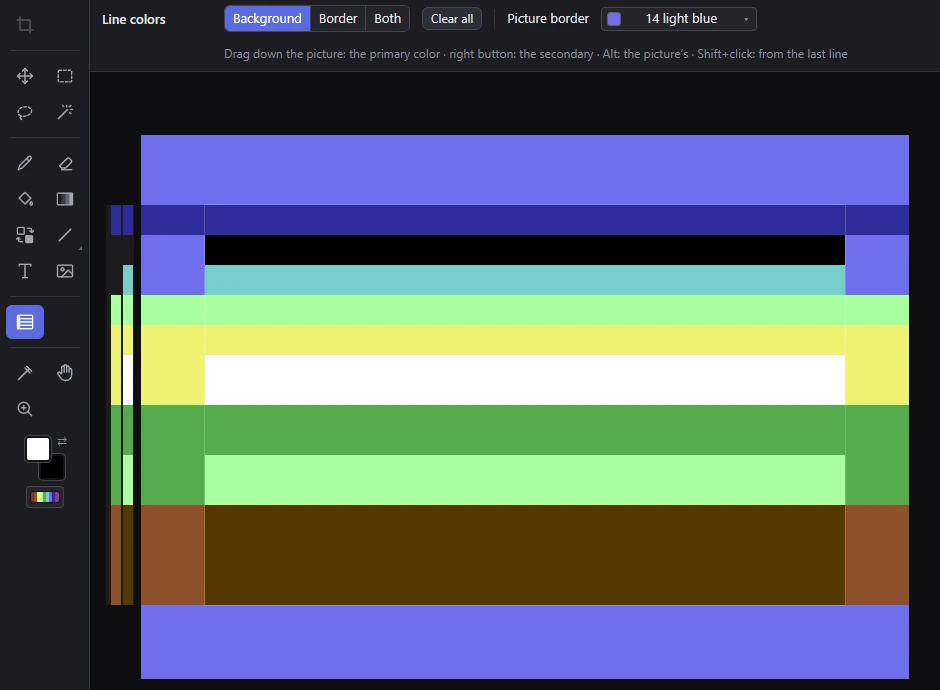
The Line colors tool (Shift+L) gives picture lines a background and a border of their own. The picture's C64 program sets them again between lines (the background register $D021, the border $D020), so a band of lines can have its own background color, and the border beside it its own color, for none of the cells' colors.
| Format | Background | Border |
|---|---|---|
| Multicolor bitmap (Koala) | Yes | Yes |
| Multicolor FLI | Yes | Yes |
| Hires bitmap | — | Yes |
| Hires FLI (AFLI) | — | Yes |
A hires bitmap shows no background color, so in hires and AFLI pictures only the border changes. The tool shows only in these four formats.
Using it
- Choose what a drag sets on the options bar: Background, Border, or Both (the same color).
- Drag down the picture, or down the border beside it. The lines under the drag take the primary color; with the right button, the secondary.
- Alt+drag puts lines back to the picture's own colors. Shift+click sets every line from the last one you set to this one.
Each drag is one undo step. Clear all puts every line back to the picture's colors.
While the tool is in hand, strips left of the screen show each line's own colors: the border (outer) and, in Koala and multicolor FLI, the background (inner). A line marked red is one a PAL C64 can't change as set (see below). Esc during a drag calls it off.
A line's background
- In its cells: a pixel in its line's background needs no cell color. A Koala 4 × 8 cell has its three colors and, on each of its lines, that line's background. A multicolor FLI 4 × 1 cell has its line's background in place of the picture's.
- Converting: the converter uses each line's background as that line's free color. The Background in the Format panel is the one for the lines that set none.
- A blank picture shows each line's background wherever nothing is painted, so the bands are there at once.
- Painting: Cell limits count a pixel in its line's background as free. A pixel painted in a color stays that color when you change its line's background later.
- Multicolor FLI shows each line's background in the FLI bug's columns left of the picture.
A line's border
The border takes the line's color across the whole screen line, left and right of the picture. Above and below the picture, and beside the lines that set none, it is the picture's own border.
The picture's border
The picture has a border color of its own: Picture border on the tool's options bar, or Border in the Format panel. A click on the border above or below the picture sets it too (the primary color; the right button, the secondary; Alt, the format's own). The format's own is what the program sets without one: a Koala picture's background color, black for the others.
The editor shows the C64's screen around the picture with its border (View ▸ Border), and so do the preview, the CRT view, the C64 program and the C64 display PNG and GIF.
Multicolor FLI on a PAL C64
Every line of an FLI picture takes the CPU's time but for a few cycles between lines. On a PAL C64 that is time for one color change. A line where the background and the border both change must change them to the same color; otherwise a PAL C64 changes its border later: on the next line with time for it. The tool says so when a drag makes such a line, and marks it red in the strips; the preview and the CRT view show the border where a PAL C64 does. An NTSC C64 has time for both.
Saving and exporting
- The C64 program sets them line by line (in a Koala or hires picture's viewer source, as tables). It runs on PAL and NTSC C64s and the Drean; a Koala or hires picture's also on the first NTSC C64s (the 6567R56A chip), which FLI pictures don't run on.
- Koala files from other programs and the Koala data hold one background: while a line has a background other than the picture's, they aren't offered.
- A Blackmail FLI file (
.bml) and the FLI data (.bin) keep a background for each line, and open with them. An FLI Designer file only when every line's background is black. - Mosaicus's PNGs keep the line colors in their note, and open with them.
- The border line by line is in the C64 program and the C64 display PNG and GIF.